
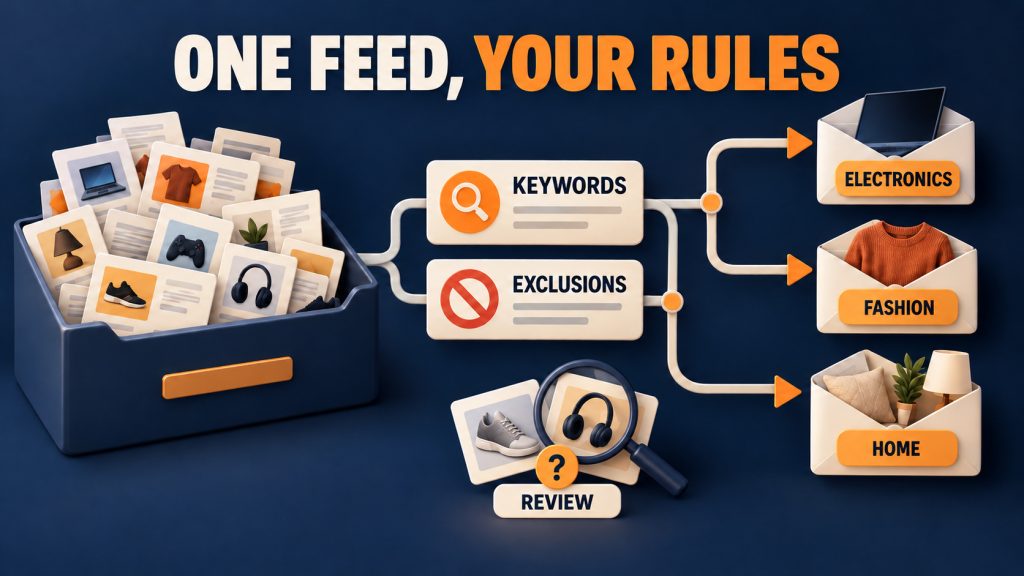
Give each deal channel a clear promise, then forward only the posts that fit it. One authorized feed can supply separate electronics, fashion and home channels through task-specific Whitelist, Blacklist and content-type choices. RedFox Auto Forward Telegram lets you make those choices without manually copying every qualifying post.
The useful starting point is not a huge keyword list. It is one audience, a short set of recognizable terms and a private check that includes posts you want to exclude. Expand to the other audiences once you can explain why each sample did—or did not—reach its destination.
Product identity: use RedFox Auto Forward Telegram (@AutoForwardNew_Bot). The previous @Auto_Forward_Messages_Bot has moved to this current handle. Manage your routes in the Web dashboard.
AffiliateTelegram is AutoForward Messages’ official affiliate-workflow partner. We explain setup and use cases; AutoForward supplies the forwarding platform.
1. Define the audience before the rule
For this example, one permitted editorial feed publishes a mixture of product picks. You want three destinations with different reader interests. These are proposed channel roles, not existing channels or measured results.
Electronics picks
- Promise: laptops and headphones, not every item that mentions a device.
- Starting Basic whitelist:
laptop,headphones. - Starting exclusion:
accessory, if you deliberately want to exclude posts containing that text.
Fashion picks
- Promise: shirts and shoes.
- Starting Basic whitelist:
shirt,shoes. - Starting exclusion: the same
accessorypolicy for this illustrative worksheet.
Home picks
- Promise: kettles and lamps.
- Starting Basic whitelist:
kettle,lamp. - Starting exclusion:
accessory.
These small lists intentionally expose the method’s limits. They are not a complete product catalogue. A post can match more than one task, and an unfamiliar synonym can match none. Decide whether overlap is acceptable before treating the channels as mutually exclusive.
A marketplace ID is not a routing rule. Enabling an affiliate setting does not select the audience or block other stores’ messages. Our independent Flipkart and Shopsy settings guide explains that distinction. Here, the decision is which messages belong in a channel—not which account supplies a link’s ID.
2. Give each control a specific job
Whitelist: a positive reason to include a post
The official Whitelist guide documents Basic words or phrases, Regex and user-based rules. A Basic comma-separated list offers alternatives: a post containing laptop or headphones has a positive match for the electronics example. Do not leave the whitelist empty and expect category selection to happen automatically.
Blacklist: an explicit reason to reject a matching post
Use a blacklist for content your audience should not receive even when it contains an allowed term. The official Blacklist reference says a blacklist takes precedence over a whitelist. In this example, laptop accessory roundup is excluded because of accessory, despite its positive electronics match.
Choose exclusions carefully. Blocking ad is much broader than “block advertisements,” because Basic matching can find that text inside unrelated words. Blocking expired would reject posts containing that word; it would not check a merchant’s live offer status. Keep corrections or useful source updates out of a broad exclusion unless that is really your editorial policy.
Senders: decide whether you need a separate identity restriction
For a single curated channel feed, the selected source is the first boundary. Start this worksheet without a separate sender whitelist: it avoids allowing every post from a trusted publisher regardless of topic. If your feed is a group with several contributors, identify whose messages you intend to include or exclude rather than guessing from a display name.
The user-filter documentation describes matching user IDs or usernames. Forwarded origins and channel-authored posts need their own representative check; the visible signature is not necessarily the identity evaluated by the rule. User-based and advanced rules have plan-dependent availability. Use the controls exposed for your account, and confirm the exact sender with a permitted sample before applying a sender blacklist.
Filter By Type: exclude unsuitable formats, not relevant links
The Filter By Type guide states that turning a filter on excludes that matching message type. For the caption-led example, enable Photo Only to reject an image with no caption. Leave Photo With Text off so product images with captions are not excluded by that choice.
Do not enable Link merely because you want affiliate links: it excludes link-containing posts. Nor should you enable Text while expecting ordinary text product picks to arrive. Filters skip the whole message; Cleaner changes elements within a message. Neither operation supplies missing product context from an image.
3. Match the wording you have, not the category you imagine
Basic matching is partial, not whole-word. The primary syntax reference explains that a short term can match inside a longer word. Accordingly, shirt can also select a post containing sweatshirt. A word found in a URL or other post text may be enough; it need not be the product’s category label.
Keep capitalization in your test set. Do not assume LAPTOP and laptop are interchangeable in every mode. The inspected Basic matching path uses literal text comparisons, and the Regex path does not add case-insensitive matching by default. Choose and test your intended case policy instead of broadening the list blindly.
When partial matches cause real mistakes, the official Regex examples show whole-word boundaries such as \bword\b. Use Python-style patterns and an explicit case policy if your account exposes Regex. This is a pattern concept, not a ready-made rule for every feed: line breaks, punctuation, formatting and terms in URLs can affect what a pattern selects.
OR alternatives and AND requirements are different
- OR: accept a post containing either of your topic terms.
- AND within a supported combined rule: require all intended conditions. The product guides describe AND/OR combinations; inspect the saved combination and test both the full match and a post missing one condition.
- Separate whitelist rules: do not assume each becomes an additional mandatory gate. A matching independent whitelist rule can admit a post. A separate “trusted sender” rule plus a separate topic rule is not a safe shortcut for “trusted sender AND this topic.”
For a source that requires both a sender restriction and topic matching, use a documented combined rule supported by your account and prove the missing-sender and missing-topic cases privately. If your current interface does not expose the needed combination, start with a source you curate yourself rather than improvising syntax. Keep this first worksheet to standalone new posts; do not substitute reply-thread modes and assume the same selection behavior.
4. Configure one paused route, then repeat deliberately
- Prepare an empty private source and private targets you control. Use your own permitted test text. Keep real readers and connected external publishing destinations out of the test.
- Create the first source-to-target task and pause immediately. The task-creation guide says creation activates a task. Keep the source empty until you have checked the paused state. Our first-task walkthrough covers endpoint selection.
- Add the electronics whitelist. In the documented Whitelist area, choose Add New, Basic and the intended content list. Select only this task in Apply For Task, save, and reopen the rule to check its content and task assignment.
- Add the deliberate exclusion. Use Blacklist for
accessory, assigned only to the test task. Check for older all-task rules already affecting it. Do not use Apply For All Tasks for this experiment. - Set the type policy. Apply the chosen Photo Only exclusion and leave useful formats unblocked. Keep optional AI rewriting, Cleaner and Replace out of the initial comparison so your source text remains easy to inspect.
- Repeat for fashion and home. Use separate tasks pointing from the same private source to their corresponding private targets, with their own keyword lists. Check your plan’s task capacity before adding routes. Reopen each task and rule; identical labels or remembered settings are not proof of assignment.
Open AutoForward and build your first focused test route →
Activated tasks run in RedFox’s cloud without leaving the dashboard or app open. That is convenient after setup, but closing the app does not pause a task. Explicitly pause when changing rules or investigating a mismatch.
5. Use six cases to expose matches, exclusions and overlap
This is an original test worksheet, not an executed bot demo. The following invented text contains no real offer, price, discount or product URL. All cases use your selected private source; sender-specific rules are absent from this baseline. Expectations follow the documented Basic inclusion, blacklist precedence and type exclusion, assuming no additional rules interfere. The observation fields are intentionally blank.
Case A — electronics match
- Input: a text post,
laptop pick — inspect the source terms. - Expected selection: electronics only; its allowed term appears, with no listed exclusion.
- Observed destinations: __________
Case B — fashion match with a caption
- Input: your own photo captioned
shoes pick — inspect the source terms. - Expected selection: fashion only. Photo With Text is not excluded in this baseline.
- Observed destinations: __________
Case C — home match
- Input: a text post,
kettle pick — inspect the source terms. - Expected selection: home only.
- Observed destinations: __________
Case D — nonmatch with no caption
- Input: your own photo with no caption.
- Expected selection: none. There is no topic keyword, and Photo Only is excluded. This case does not isolate which of those two gates stopped it.
- Observed destinations: __________
Case E — positive match overridden by an exclusion
- Input: a text post,
laptop accessory roundup. - Expected selection: none. The electronics whitelist matches, but the blacklist rejects
accessory. - Observed destinations: __________
Case F — ambiguous editorial fit, two literal matches
- Input: a text post,
laptop bag and shoes picks. - Expected selection: eligible for electronics and fashion under these literal lists; home does not match. The rules do not understand that a laptop bag may fall outside your electronics promise.
- Editorial decision: accept cross-posting, refine the rule, or curate this post separately. Do not call an unwanted overlap an exclusive-routing success.
- Observed destinations: __________
Add a capitalization variant and a near-match such as sweatshirt when refining the lists. If you introduce sender rules, add a permitted and a non-permitted sender case. Those are follow-up checks, not outcomes hidden inside the six-case worksheet.
6. Inspect the targets, not just the saved rule
Once all destinations are private and the rules are saved, activate the test routes deliberately. Post one case at a time, inspect all three targets, and record the actual destinations. Keep the source text, message type, task label and time alongside the observation. Pause again after the check. A non-posting sample preview can help inspect content but cannot prove delivery or exclusion in the real targets.
A relevant post is missing
Check the task’s paused state, endpoints and posting permissions first. Then inspect capitalization, unintended substring exclusions, active type filters and all-task rules. A blocked message is not an affiliate conversion failure. Change one setting and test a new representative post, rather than replaying uncertain output into a live audience.
An irrelevant post arrives
Read the complete source text for an allowed term in a compound word, URL or caption. Check whether another whitelist rule admits it and whether a second active task reaches the target. For case F, tighten the audience definition before adding more terms. If you need exclusive destinations, remove overlaps or curate the ambiguous content; keyword filters do not supply a universal category classifier.
A type or sender restriction behaves unexpectedly
Keep the route private. Recheck the saved exclusion direction and compare a case differing only in that type or sender. If still unclear, give support a sanitized sample, task label, selected mode, time, expected destinations and actual output. Do not include account tokens or private source content you are not allowed to share.
7. Move one proven audience route to the authorized feed
Keep the task paused while replacing the test endpoints with your real authorized source and intended destination. Confirm you may republish the source text and media, the sending account or bot can post to the target, and your affiliate arrangement permits the placement. Segmentation does not itself approve a merchant link or rewrite its terms.
- Preserve the useful post: product wording, variants, conditions, links and required disclosures should survive any later formatting or cleanup.
- Keep selection separate from link treatment: add your supported affiliate mode and optional transformations one at a time, then inspect the final actual output again.
- Review real vocabulary: a list that selects your examples may miss the feed’s synonyms or match its footer. Refine it with representative authorized posts.
- Expand deliberately: activate one audience route first, inspect its early output, and then add the others within your account’s capacity.
The payoff is a channel readers can understand: a clear audience promise backed by explicit selection rules, rather than every source post sent everywhere. Start with one short whitelist, one justified exclusion and the six-case comparison in the AutoForward dashboard. For the surrounding affiliate workflow, see our no-code workflow overview.