
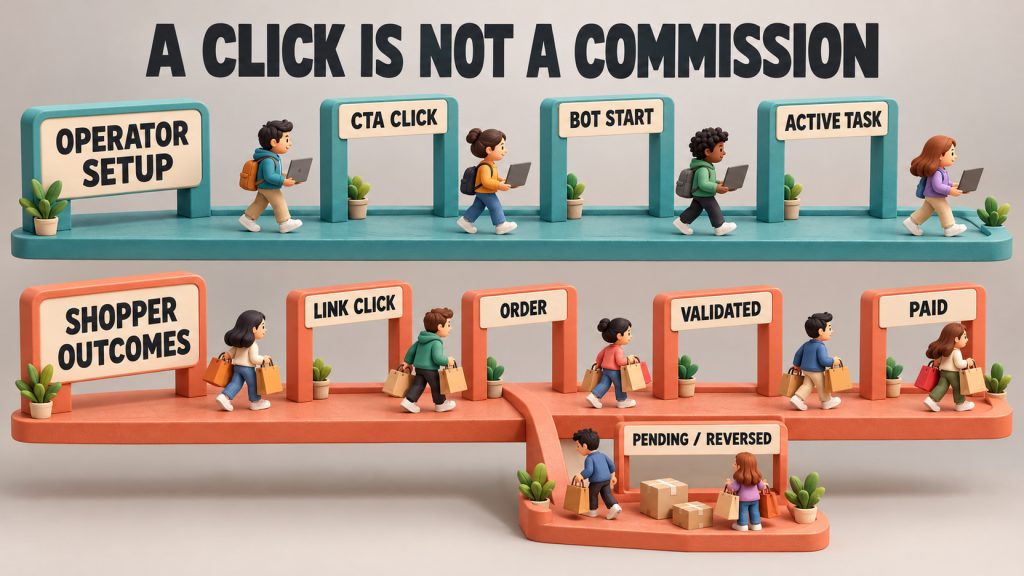
A link click shows interest. It does not show that someone started your bot, activated a forwarding task, placed a tracked order or earned you a paid commission. To decide what to improve or expand, measure an affiliate Telegram workflow as two separate funnels, give each stage one source of truth, and compare only like-for-like windows, cohorts and currencies.
AutoForward’s part is the message workflow: getting the intended deal, with your link, to the right channel without manual reposting. Merchants and affiliate networks track clicks, orders and commission, so their reports remain the source of truth for money. This guide includes a blank reporting template and decision rules; it contains no real data, benchmark or income claim.
Product identity: use RedFox Auto Forward Telegram (@AutoForwardNew_Bot). The previous @Auto_Forward_Messages_Bot has moved to this current handle. Its official Web dashboard, iOS app and Android app are the management entry points. AffiliateTelegram is AutoForward Messages’ official affiliate-workflow partner, not the affiliate network.
Scope: as the AffiliateTelegram overview explains, AutoForward is message automation software, not an affiliate network, and it does not guarantee clicks, sales or commission. Use the analytics and network reports you actually have access to; this guide does not assume an installed tracking setup or a built-in sales dashboard.
1. Separate the operator funnel from the shopper funnel
Two different groups of people move through an affiliate Telegram workflow, and their numbers answer different questions.
Operator setup funnel
- Who: people deciding whether to use the automation, including you.
- Stages: article visit → site CTA click → bot start → activated forwarding task.
- Question: is the setup path working, and are tasks actually going live?
Shopper outcome funnel
- Who: your channel’s readers.
- Stages: posted product link → network-recorded click → tracked order → validation → payment and later adjustments.
- Question: are the posted deals producing tracked, validated commission?
Between the two sits output quality: whether each delivered message carries the intended product, variant, your link and the disclosure. Your automation settings influence this stage most directly, so check it before adding traffic.
Do not chain the funnels into one person-level conversion rate. Operators and shoppers are different populations, and linking a site visitor to a bot start or an order needs an authorized, verified join that you may not have. Without one, report each stage on its own.
2. Give every stage one source of truth
Use one card per stage. If a source is not available to you, record the stage as not instrumented, never as zero.
Site CTA click
- Count: sessions with at least one click on the specific CTA; keep raw click events as a separate number.
- Source: a configured, consent-compliant site analytics event or export for the exact page and destination. Google Analytics enhanced measurement, for example, can record an outbound click when a link leads away from your domain.
- Rate: sessions with that CTA click ÷ eligible measured sessions on the same pages, period, timezone and filters.
- Does not prove: that Telegram opened, the bot started, a task was activated or anything was sold.
Bot start
- Count: distinct accounts with an actually received start, kept apart from repeat starts.
- Source: an authorized product-side report or a genuine, scoped manual observation. Telegram’s bot deep-linking documentation explains how a bot conversation begins with /start; it is a protocol description, not a report you can read.
- Rate: not calculable against site clicks unless a valid join exists; otherwise report the count alone.
- Does not prove: a connected account or an activated task.
Task activation
- Count: distinct accounts reaching their first verified active forwarding task within a follow-up period you set in advance; count tasks separately.
- Source: the saved task state you read back, or an authorized first-activation event. A screenshot of today’s state does not show when activation first happened.
- Rate: first-activated accounts ÷ eligible starting accounts in the same cohort, excluding accounts that were already active, and only when you have that cohort.
- Does not prove: correct delivery or a merchant sale. Never divide a task count by people and call it user conversion.
Verified output quality
- Count: inspected source-to-target cases, checking delivery, intended product and variant, your link, disclosure and freshness, with caption and buttons checked separately.
- Source: the actual permitted messages and their destinations, not a save confirmation.
- Rate: cases meeting every check ÷ all inspected cases, listing unresolved cases separately and stating how the sample was chosen.
- Does not prove: that every post is correct or every purchase attributable.
Product-link click
- Count: network-reported clicks for the stated program, link and placement, matching raw or unique to the export’s own definition.
- Source: the merchant or network click report. Shortener or site clicks are a separate counter.
- Rate: report the count. Compare it with exposure only if you have a compatible measure for the same posts; there is no default Telegram view-to-click rate.
- Does not prove: an order, qualifying attribution or payment.
Tracked order
- Count: deduplicated network transactions for the program and account; keep leads, bonuses and pay-per-click items out of a purchase count.
- Source: the network’s transaction export. Distinguish order, line item, shipment, adjustment and status update before deduplicating.
- Rate: tracked purchase transactions per 100 tracked clicks from the same link, placement and click cohort, after a long enough follow-up. If your report filters only by transaction date, label the result a period ratio, not cohort conversion.
- Does not prove: approved commission, or that automation caused the sale.
Pending, approved and declined
- Count: transactions and commission amounts by status, in each currency, at a recorded snapshot time.
- Source: the network’s validation or transaction report, using its own status definitions.
- Rate: approved ÷ all tracked eligible orders in the cohort, with pending and declined shown alongside. If you show approved ÷ (approved + declined), label it resolved-only and report how much of the cohort is resolved.
- Does not prove: that approved means paid, or that a young cohort is comparable with a mature one.
Paid commission and later adjustments
- Count: actual commission amounts by currency with payment identity and date, distinguishing sent from received where you can.
- Source: the network’s payment report, reconciled to your own receipt record if you claim cash received.
- Rate: net paid = recorded payments minus separately recorded later adjustments, only when the payments are not already net. Never subtract a reversal twice.
- Does not prove: that gross order value is commission, that every approved amount has settled, or that a paid amount can never be adjusted.
3. Fix the window, cohort and currency before comparing
- Name the scope first: site property, network account, market, program or advertiser, currency, route or placement, and the unit of each event. Keep secrets and personal identifiers out of the report.
- Write the window precisely: start date included, end date excluded, the timezone, and the time you took the snapshot.
- Keep four clocks apart: your report range, the merchant’s attribution rules, the order validation or return period, and the payment period. Changing a site analytics lookback setting does not change a merchant’s attribution.
- Follow a click cohort: group clicks by click date and follow their orders through the program’s actual rules. Dividing this week’s orders, some from earlier clicks, by this week’s clicks is not cohort conversion.
- Re-export, don’t re-count: when a pending order becomes approved, it is the same order with a new status, not a second order.
- Don’t pool unlike data: keep different countries, programs, currencies and click definitions separate. Compare cohorts of equal maturity, and note offer, source and traffic-mix changes.
- Unknown is not zero: an unavailable source is “not instrumented,” and a zero denominator is “not calculable,” not 0%.
Programs set their own rules. Amazon’s US Associates Program Policies, for example, define qualifying purchases with their own session and ordering conditions and exclude cancelled, returned or refunded orders. Another market or network can work differently, so record the rule you used and the date you checked it.
4. Keep pending, approved, paid and reversed apart
Commission moves through states that can look alike in a dashboard but mean different things.
- Pending: tracked but not yet validated by the advertiser. Awin’s Publisher Transaction Report notes that pending transactions are not considered owed until approved.
- Approved: validated, but not necessarily paid. Awin’s Approved view includes both paid and unpaid transactions, and its payment reporting tracks payment status separately.
- Declined or reversed: validated as declined, or reversed after a return, cancellation or failed qualification. Keep both the count and the commission amount.
- Paid, and still adjustable: EarnKaro’s Terms & Conditions describe pending profit becoming validated after retailer confirmation, and reserve the right to adjust or reclaim amounts credited in error, including validated or already paid ones.
Approval and payment are overlapping views of the same commission, not separate revenue lines to add together. Use each network’s own definitions; this list is a reading guide, not a universal status taxonomy.
5. Use only tracking your network supports
- Network labels: Awin, for example, supports click references created through its own link tools and shown in its reports. Fields, syntax and visibility differ by network.
- No improvised parameters: don’t append arbitrary UTM tags or sub-IDs to merchant affiliate links. Create labeled links in your network’s own tool, then confirm in the delivered message that the label is still there.
- No personal data: use route or placement labels such as a channel name, never a reader’s identity.
- Bot start parameters: Telegram lets a bot link carry a start parameter, but whether you can see those starts depends on reporting you actually have. Don’t plan a funnel around data you cannot access.
6. Copy a blank reporting template
The template is empty by design: no observations, zeros or sample outcomes. Fill one metric block per metric, and write “not instrumented” rather than 0 when you have no source.
REPORT HEADER
Report owner: [ ]
Site or property: [ ]
Network / account / market / advertiser: [ ]
Route or placement label: [ ]
Currency: [ ]
Observation window (start included, end excluded, timezone): [ ]
Cohort basis (click date / order date / payment period): [ ]
Network attribution rule (source and date checked): [ ]
Validation follow-up rule: [ ]
Snapshot taken at (timezone): [ ]
Cross-surface join (yes with evidence / no / unknown): [ ]

METRIC BLOCK (repeat for each metric)
Metric: [ ]
Value: [ ]
Unit: [ ]
Source export and filters: [ ]
Event window: [ ]
Snapshot time: [ ]
Denominator, or not applicable: [ ]
Cohort or join limit: [ ]
Decision: [ ]
Metrics to report
- Operator setup: eligible article sessions; sessions with the selected CTA click; distinct observed bot starts; distinct first-activated accounts; total active task count, as a separate unit.
- Output quality: inspected output cases, with freshness and link issues.
- Shopper outcomes: network-reported product-link clicks; tracked purchase transactions; pending commission by currency; approved or validated commission by currency; declined or reversed transactions and commission adjustments; paid or sent commission versus cash received.
- Gaps: any unresolved data or attribution gap.
Keep exports private. A shared version of this report needs no customer IDs, secrets or real transaction details.
7. Read the report before changing anything
These are decision rules, not results.
- CTA clicks, but bot starts unknown: fix the measurement handoff before concluding that activation is weak.
- Activated task with wrong or expired output: fix the route or the freshness check before adding traffic.
- Product-link clicks, but no tracked orders: check the market, account, attribution rules, offer and network reporting. Revenue alone does not diagnose a broken link; the reporting branch of our link diagnostic guide helps keep link processing and attribution apart.
- Pending commission in a young cohort: wait for the program’s validation to mature. It is neither paid revenue nor failed sales yet.
- Approved but unpaid: check the network’s payment status, not your message formatting.
- Mature, comparable cohorts and clean output checks: choose one bounded improvement and keep your guardrails. A before-and-after pattern is descriptive; changes in offers, traffic, stock and attribution can explain it, so do not claim the automation caused the change.
Report time saved only if you actually measured the work, and calculate return on investment only once you know the real cost and the net commission in scope.
8. Start with output quality and one network report
Pick one route. Inspect a few private outputs against the checks above, then reconcile the matching network report for a defined, mature window before you add channels or traffic. Record which route and placement each report covers in your operations inventory.
Open AutoForward to inspect one route’s output → Activated forwarding tasks run in the cloud, while your merchant and network reports remain the record of clicks, orders and commission.