
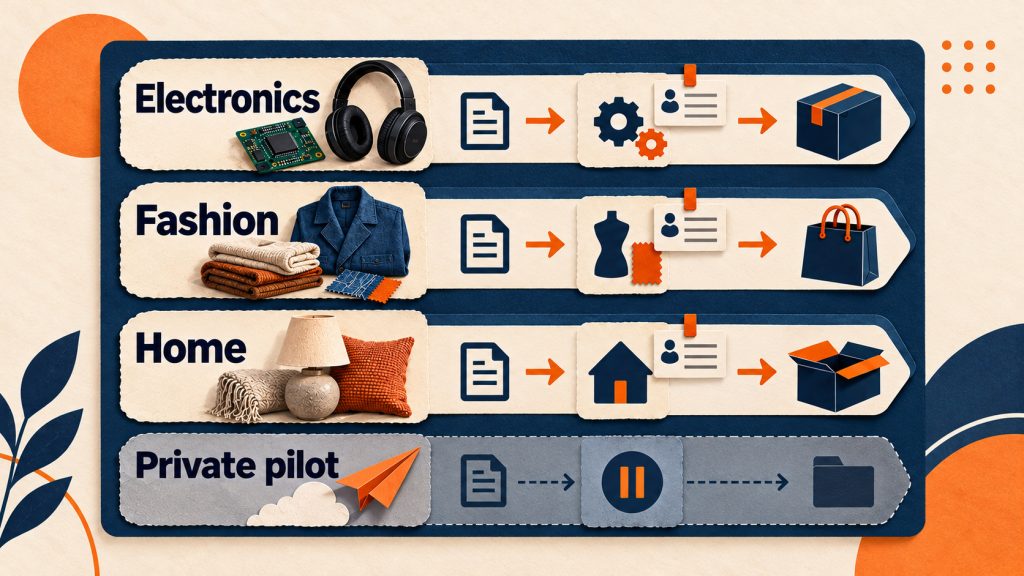
Several deal channels are easier to run when every route has a clear job: a named source, a defined audience, the right affiliate account and rules that belong only to that task. AutoForward lets you keep those settings separate instead of making every channel inherit one growing collection of edits.
Use the operations inventory below to plan electronics, fashion and home flows, prove one private route at a time and change a live setup without confusing its endpoints. This is an operator worksheet, not an account export or a claim that the example tasks have been created.
Publisher relationship: AffiliateTelegram is AutoForward’s official partner for affiliate workflows. AutoForward provides the forwarding and automation platform; merchants and networks determine account, placement and payout eligibility.
Give each route a distinct job
Start with the audience promise, not the number of channels. An electronics channel may need model and compatibility details; a fashion channel may need size or variant conditions; a home channel may need dimensions and pack contents. Those editorial needs can justify separate tasks even when the source owner and operator are the same.
AutoForward supports separate sources, destinations and task settings, as described in the product overview. Once activated, forwarding tasks run in the cloud: you do not need to keep the Web dashboard or management app open. That convenience does not replace checking the route, its content and its actual results.
This guide is about keeping a group of workflows understandable. It is not a keyword-filter recipe, a duplicate-filter tutorial or a message-redesign guide. Record those choices in the inventory, but validate each feature for the job it actually does.
Keep an operations inventory
Make one record per task. Keep the descriptive name separate from the actual saved task identity, so similarly named routes cannot be mistaken for each other. The brackets below are blank fields, not invented identifiers or a configuration file to import.
- Task name and saved task ID
- [DESCRIPTIVE NAME] / [ACTUAL SAVED TASK ID]
- Owner and purpose
- [RESPONSIBLE OPERATOR] / [AUDIENCE PROMISE]
- Source
- [EXACT AUTHORIZED SOURCE AND ID]
- Target
- [EXACT OWNED OR AUTHORIZED TARGET AND ID]
- Market and affiliate ID
- [MARKET] / [PROGRAM AND OWN ID, OR EXPLICITLY NONE]
- Mode
- [ORDINARY AFFILIATE / NETWORK REPLACE / EARNKARO PER MARKETPLACE / LEGACY EXCLUSIVE EARNKARO]
- Rules
- [TASK-SCOPED FILTERS, REPLACE, DUPLICATE AND FORMATTING CHOICES]
- Link presentation
- [SHORTENING OFF OR VERIFIED EFFECTIVE SETTING; NO SECRET VALUES]
- Status and last check
- [PAUSED OR RUNNING] / [ACTUAL CHECK DATE AND PRIVATE EVIDENCE REFERENCE]
Do not put API keys or login tokens in this sheet. For a configured credential, an internal descriptive reference is enough. Preserve actual task and chat identifiers exactly in your private record; do not derive them from a display name.
Plan electronics, fashion and home flows
These are three planning records with distinct operating decisions. They are not live feeds, offers or tested routing results.
Electronics: model-focused product picks
- Task: electronics route; actual saved task ID [TO RECORD].
- Source → target: [AUTHORIZED ELECTRONICS SOURCE] → [OWN ELECTRONICS CHANNEL].
- Market and ID: [ACTUAL MARKET]; the operator’s corresponding supported marketplace ID, entered on this task only.
- Mode: ordinary supported affiliate conversion; no inherited fashion-network wrapper.
- Rules: deliberately selected electronics filters; a task-scoped presentation rule if needed. Preserve exact model, compatibility and offer conditions rather than inferring them from a generic category name.
- Check: the clicked product and variant agree with the post; an unrelated fashion message does not qualify simply because it contains a shared promotional word.
Fashion: network-linked product selections
- Task: fashion route; actual saved task ID [TO RECORD].
- Source → target: [AUTHORIZED FASHION SOURCE] → [OWN FASHION CHANNEL].
- Market and ID: [ACTUAL MARKET]; record the provider/account behind the own network-generated link rather than inventing a dedicated merchant ID field.
- Mode: network Replace, using a provider-valid product mapping. If choosing EarnKaro API conversion instead, record it as this task’s marketplace choice (according to the link’s verified marketplace, in releases with marketplace selection) or as a separate legacy exclusive EarnKaro task, never as a second converter on the same link.
- Rules: fashion-only Replace association and filters; preserve size, color and availability conditions from the authorized source.
- Check: another product is not redirected to the mapped item, and electronics/home tasks do not carry the fashion replacement.
Home: detail-led household picks
- Task: home route; actual saved task ID [TO RECORD].
- Source → target: [AUTHORIZED HOME SOURCE] → [OWN HOME CHANNEL].
- Market and ID: [ACTUAL MARKET]; the own supported affiliate ID intended for this task, even if the same operator runs the other channels.
- Mode: ordinary supported affiliate conversion, with shortening initially off for inspection.
- Rules: home-only selection and presentation choices; record any duplicate filter separately. Preserve dimensions, pack contents and qualifying conditions.
- Check: the caption belongs to the accompanying media, the destination is correct and no electronics-specific footer or fashion wrapper appears.
If all three routes read a mixed source, filters need their own positive and negative checks. A message matching more than one task may reach more than one target; do not assume that separate tasks implement exclusive first-match routing. A curated category source is a simpler starting point when precise combined filtering has not been established.
Keep IDs and Replace rules task-scoped
Enter the intended own IDs on each task and reopen the saved settings. Do not assume that a familiar task name, a copied setup or an ID on a different task supplies the right account here. Flipkart and Shopsy settings are independent, as explained in the supported-link guide; merchant eligibility still belongs to the particular account, market and placement.
For Replace, explicitly select the task in Apply For Task, then check its activation in the task’s own rule list. The Replace guide describes global application when the task scope is left blank. Avoid Apply For All Tasks for a channel-specific edit: a harmless fashion label could become a misleading electronics footer.
Also check the documented Show Header Forwarder incompatibility before relying on Replace. A stored rule and an active task association are different things.
Record EarnKaro’s saved mode per task. With marketplace selection, note each marketplace’s Default or EarnKaro choice and the failure action, with Final Redirect Link off; a legacy exclusive EarnKaro task stays separate from active marketplace IDs, affiliate shortening and Final Redirect Link. Optional TeleURL settings belong in the inventory per task and link type; do not turn “we use short links” into an unexamined rule for every route.
Prove a controlled private pilot
Build the first route against an owned, empty private source and an authorized private target. Do not select a busy production source while you are still deciding what the task should do.
- Confirm the source is under your control and contains no incoming feed or automated writer. Confirm the target is the intended private destination.
- Create the pilot, then pause it immediately. The task guide describes creation as activating the task; do not assume a new task starts paused.
- Apply only that route’s IDs, filters and Replace rules. Save, reopen and compare the settings to its inventory record.
- Use sample preview if available on your server. It does not post; shortening can still consume quota.
- For an authorized private output check, start only the pilot, provide deliberate permitted test content, inspect the exact target and pause again if anything is uncertain.
Check an intended post, an irrelevant post and a post that could fit two categories. Compare the product link, retained conditions, media and required disclosure. Leave the observation record blank until you have actually inspected the result. This article does not report a completed pilot.
Change live routes deliberately
Pause the task before changing its source or target. Record the old endpoints and relevant settings, make the intended change, reopen it and compare the new record before resuming. If a result is missing or uncertain, inspect the destination before retrying; a lost confirmation is not proof nothing was posted.
Treat changing an affiliate account, switching conversion mode or widening a Replace pattern as a meaningful change too. Recheck the affected product mapping and one unrelated control instead of accepting the save confirmation as output proof.
Task folders can make related routes easier to find. Their bulk toggle can affect every task inside a folder, so keep private pilots visibly separate and check folder membership before a bulk action. A folder is an organizational aid, not a rule-isolation guarantee.
The inventory is a human-readable recovery reference. It does not guarantee that cloning or restoring a task reproduces every affiliate path, credential reference or current entitlement. Check the resulting task and outputs after any supported copy or restore operation.
Expand within your plan and review capacity
Multiple tasks do not mean unlimited tasks, sources, targets or feature access. Check your current account’s limits and the availability of the controls you need before adding another route. The plan documentation explains where package choices are managed; this worksheet is not a price quote or an account-entitlement check.
Expand one proved route at a time. Keep the inventory current when an endpoint, affiliate account or rule changes, and review whether each channel still serves its audience. That discipline makes the next channel an understandable addition rather than another hidden dependency.
Open AutoForward and compare one existing task with the worksheet, or use RedFox Auto Forward Telegram (@AutoForwardNew_Bot). For the initial source-and-target setup, use the first affiliate forwarding-task guide.