
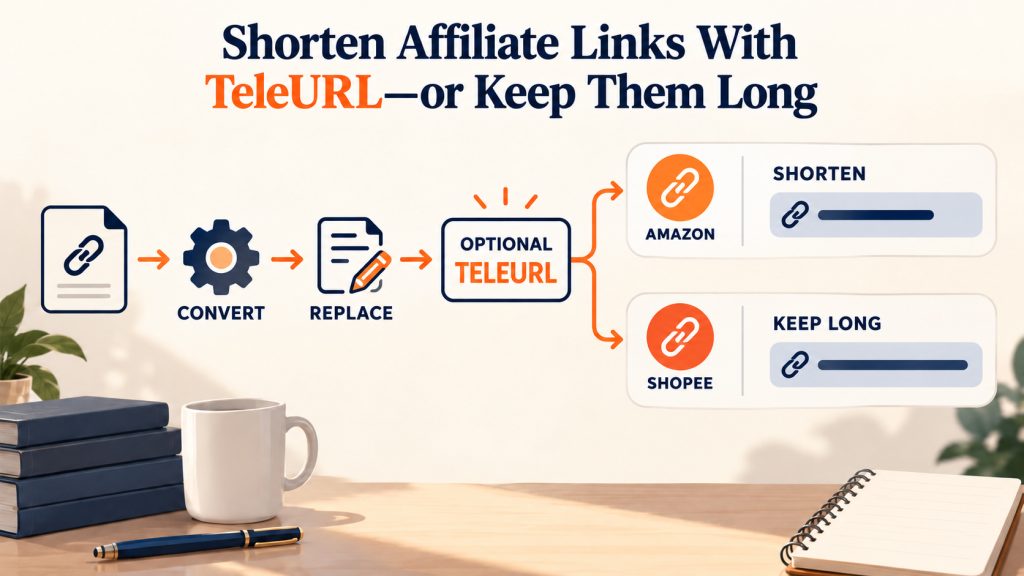
Shorten the affiliate links that benefit from it—and leave the others readable. RedFox Auto Forward Telegram (@AutoForwardNew_Bot) supports optional TeleURL shortening after affiliate conversion and Replace. Per-type choices let one task shorten eligible Amazon results while keeping Shopee long, rather than treating every URL in a deal post the same way.
Shortening changes the presentation of an eligible destination; it does not create an affiliate account, supply a missing ID or prove commission. If TeleURL fails during processing, the final eligible affiliate/Replace long URL remains in the message.
Product identity: the previous @Auto_Forward_Messages_Bot has moved to @AutoForwardNew_Bot. Use the official Web dashboard, iOS app or Android app. AffiliateTelegram is AutoForward Messages’ official affiliate-workflow partner; AutoForward supplies the automation platform.
1. Make shortening a presentation choice
Choose TeleURL when compactness serves the reader
- Good fit: a long eligible affiliate or network-wrapper link makes a short deal post difficult to scan.
- Prerequisites: the underlying destination is correct, the type is supported, and your owned verified TeleURL key is Available.
- Account condition: the relevant merchant/network terms and your placement arrangement must allow that link treatment. AutoForward’s support is not merchant approval.
Keep the long result when inspection matters more
- Good fit: your first account-ID or product-destination check, an audit sample, or a program arrangement that does not permit an extra shortener.
- Benefit: you can inspect the affiliate identity and destination without first expanding a compact link.
- What stays available: turning shortening off for a type does not disable its affiliate conversion or Replace processing.
There is no requirement to shorten all supported types. Use our supported-link workflow guide to establish the right conversion method first, and the optional TeleURL overview for the service’s documented long-link fallback.
2. Convert first, Replace second, shorten last
- Affiliate processing: the applicable converter handles a supported input using your configured identity, or recognizes an eligible existing promotion link.
- Replace: selected rules can update the content or an eligible URL.
- TeleURL: the effective per-type selection applies only to eligible destinations still present in the final content.
This order avoids shortening a discarded intermediate URL. A URL-local wrapper created from an eligible eBay or AliExpress link retains its original eBay or AliExpress type; it does not borrow the replace type’s switch or key.
Not a shorten-everything switch: unrelated CTA, header/footer and Telegram URLs, private URLs, existing TeleURL links, whole-caption or multi-URL Replace outputs and poll options are outside this path. Header or footer placement alone does not create eligibility. Do not assume all links appended to a message are processed. The Amazon US mode that only displays a product URL and tag also remains outside this shortening path.
3. The current contract has eight types
The consolidated configuration contract checked on 13 October 2026 accepts these type keys, in this order. They describe eligible processing paths—not eight promises to shorten any URL carrying a marketplace name.
amazon: eligible supported Amazon processing results; not the excluded US display-only URL-and-tag mode.awin: eligible results from the supported Awin processing path.flipkart: eligible supported Flipkart conversion results.shopsy: eligible supported Shopsy conversion results, with its independently configured identity.shopee: eligible supported Shopee affiliate results, including compatibility with its older dedicated shortening setting.replace: only eligible Myntra-network wrapper provenance created by Replace directly on a URL—not arbitrary Replace text or every network wrapper.ebay: eligible supported eBay results and their URL-local wrappers; eBay’s own type governs them.aliexpress: recognized existing promotion links of the forms.click.aliexpress.com/e/[TOKEN]and eligible URL-local wrappers. A stored Tracking ID does not generate a promotion link or transfer its ownership. Supply a promotion link created by your own affiliate account.
EarnKaro is not a ninth TeleURL type; it is an opt-in converter that runs before shortening. In releases that support marketplace selection, TeleURL can shorten a confirmed EarnKaro conversion: Amazon, Flipkart and Shopsy use their effective type setting and key, Other uses the common setting, and a shortening failure keeps the converted URL. Final Redirect Link must be off for that selection. A task without marketplace choices uses the legacy exclusive mode, where active direct affiliate IDs, effective affiliate/Shopee shortening and enabled Final Redirect Link conflict. In either mode, do not interpret a failed EarnKaro conversion as the long-link fallback described here.
4. A stored key is not the effective selection
Per-type choices are stored under affiliate_short_url_overrides. Each type can be inherit, on or off. Read the choice together with the common setting, any older Shopee setting and the selected key’s status.
Inherit: follow the existing defaults
- Most types: use the common shortening flag and common key.
- Shopee: when its older dedicated shortening flag is on, use that flag/key; otherwise use the common setting.
- Stored override key: ignored in inherit mode. Merely saving a key does not turn the type on.
On: enable this type independently
- Switch: on works even when common shortening is off.
- Key priority: use the nonempty per-type key first. Without one, Shopee uses its dedicated key when its dedicated flag is on; otherwise use the common key, even if the common flag is off.
- No automatic substitute: the effective key must be yours, TeleURL’s and Available. An invalid or unavailable selected key does not cause the system to pick another saved key.
Off: keep this type long
- Switch: suppress TeleURL for this type, including the older dedicated Shopee path when the type is Shopee.
- Conversion: the affiliate and Replace stages remain enabled according to their own settings.
- Stored reference: a key may remain saved while inactive; that reference alone is not a TeleURL call.
Review inherited defaults when expanding a task: eBay and AliExpress also inherit the common setting. On a supporting runtime, common shortening already on plus no override for those types means eligible destinations can be shortened. Set a deliberate off override for a type you want to exclude.
Updates merge by type and field. An empty override object does not clear previously saved choices; resetting one type to inherit is not the same as disabling it. Reopen the task after saving, especially if reverting to inherit would make an older flag/key active again.
5. Configure a paused private route, then read it back
- Prepare the route: use private source and target chats you control. If creating a task, keep the source empty and pause immediately after creation, because the creation guide documents activation on create. Do not add samples while configuring.
- Check conversion first: establish a correct long-link baseline and the applicable account/placement conditions before adding shortening. Source/target choose chats, not affiliate-ID filters.
- Select a verified key: use a saved TeleURL credential belonging to the task owner with Available status. The documented credential setup describes verification; TeleURL Settings is the key-management destination for your signed-in TeleURL account. Enter secrets only through the secure credential setup, not task JSON, messages or screenshots.
- Choose each type deliberately: for example, Amazon on with the intended key and Shopee off. Do not rely solely on the common switch if an older Shopee flag is still active.
- Save only the intended changes: reopen the same task and check every affected mode, common/dedicated default and effective key. Selecting a key alone does not automatically set its type to on.
- Check behavior separately: use non-posting sample preview when your server offers it, or a permitted private-route sample. Preview may consume TeleURL quota and does not prove delivery.
The three-mode behavior is the current configuration/runtime contract, not a claim that this guide inspected every deployed client. An older runtime can ignore overrides and continue using legacy flags. Save/readback confirms storage; actual message inspection establishes behavior. If those disagree, keep the task paused and ask support to check the supporting runtime rather than assuming an off override has already taken effect.
6. A many-link post: duplicates do not multiply the allowance
This is an original non-runnable decision worksheet. Every token below stands for a final destination; none is a URL, credential, short-link result or error log. Assume the account conditions and relevant converters are already satisfied and the selected TeleURL keys are Available.
Deliberately conflicting switches
- Common setting: on with an owned verified common key.
- Amazon: on with an owned verified per-type key.
- Shopee: off, even though its older dedicated flag is on with a saved key.
- eBay: off. Awin, Flipkart, Shopsy, eligible Myntra Replace and existing AliExpress promotion paths inherit common on.
Message-body inventory
- Amazon: A1, A2, A3; A1 appears again twice elsewhere in the body.
- Awin: W1, W2.
- Flipkart: F1, F2.
- Shopsy: P1, P2.
- AliExpress: L1, an owned recognized existing promotion destination.
- Myntra Replace: M1, an eligible URL-local network wrapper; M1 also repeats once.
- Shopee: S1 and its repeat, both excluded by Shopee off.
- Ambiguous shared wrapper: X1 is produced by both an eBay URL-local path and a Myntra Replace path, with different effective selections: eBay off versus Replace inherit-on.
- Unrelated links: a channel CTA and a footer information link, neither carrying eligible affiliate/Replace provenance.
What to check—not a fabricated provider result
- Count distinct destinations: A1–A3, W1–W2, F1–F2, P1–P2, L1 and M1 are 11 distinct shortening-eligible destinations after type selection. The repeated A1 and M1 occurrences do not create additional destinations.
- Apply the ceiling: the documented allowance is at most 10 distinct eligible destinations per processing pass, not 10 occurrences or 10 per type. Do not design a post that requires all 11 to become short. Beyond the allowance, retain long destinations; this worksheet does not promise which provider calls succeed.
- Keep repeats consistent: a repeated eligible destination needs only one shortening request in the pass. If it receives a short result, reuse that result for its repeated occurrences; if shortening fails, keep the final long destination for those occurrences.
- Respect exclusions: S1 stays long despite the older Shopee switch being on. The unrelated CTA/footer links do not become candidates merely because common shortening is on.
- Do not borrow a type’s permission or key: the documented runtime implementation protects an identical wrapper claimed by two types with different effective selections. X1 remains long rather than silently adopting the other type’s on choice. Avoid converging different marketplace rules onto an indistinguishable shared wrapper.
Build your own inventory from the final destinations after conversion and Replace. Two source URLs that converge on the same destination are not two independent shortening slots; two genuinely different final destinations are.
7. Separate fallback, delivery and attribution
If TeleURL errors, times out or its selected key becomes unavailable at runtime, AutoForward keeps the final eligible affiliate/Replace long destination and continues the forwarding path. It does not revert to another publisher’s original tracking link, swap to a different credential or fall back to Bitly when TeleURL was selected. Existing Bitly behavior on paths not selecting TeleURL is separate.
- Unexpected long link: check eligibility, the effective type choice, key status, distinct-destination allowance and the actual final URL after Replace. Long does not automatically mean affiliate conversion failed.
- Unexpected short link: check inherited common settings and the older Shopee setting. A supporting runtime’s off choice suppresses shortening; a stale saved key is not proof of which path ran.
- Unclear save: read back the exact task before retrying. API errors can accompany HTTP 200; storage and provider acceptance are different outcomes.
- Actual destination: inspect the target message and expand each short link to verify the intended product and affiliate context. Check purchase-button destinations separately from caption links.
- Business outcome: processing status or shortener clicks are not merchant-attributed orders or approved commissions. Use the relevant affiliate program’s reporting for those.
Keep any observation note free of raw keys and private URLs. A mode, sanitized URL structure, time, expected behavior and actual target observation make a useful support report without inventing an error or exposing credentials.
8. Start with one type, not a blanket switch
Next action: open the official AutoForward dashboard, keep your test task paused, and choose one supported type to shorten and one to keep long. Save, reopen, then inspect a permitted sample before expanding. Our first-task guide covers the private-route checks and pausing before changing real endpoints.
Once activated, the forwarding task runs in the cloud without leaving the app or dashboard open. Your repeatable rule is simple: correct destination first, deliberate per-type presentation second, actual result inspection before scale.