
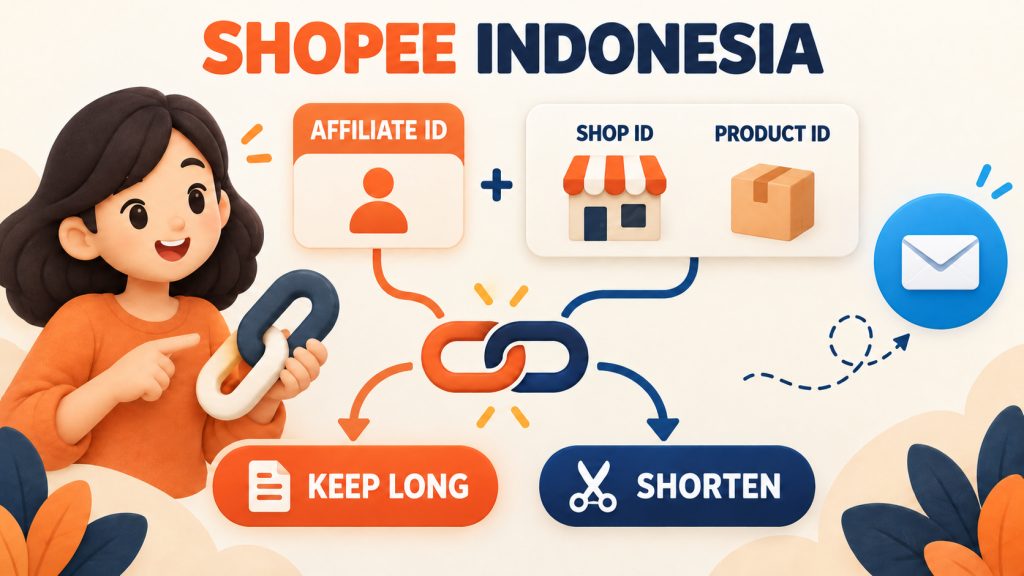
Apply your own Shopee Affiliate ID while forwarding supported deal links—without manually rebuilding each one. RedFox Auto Forward Telegram (@AutoForwardNew_Bot) can turn supported Shopee Indonesia URLs into affiliate redirects using the ID saved in your task. Start with the right account identity, inspect a long-link result, then decide whether optional TeleURL shortening serves your channel.
This guide uses Shopee Indonesia: the documented converter recognizes shopee.co.id, www.shopee.co.id and s.shopee.co.id. Do not transfer its ID-finding instructions or URL format to Vietnam, India or another market. A Shopee brand name alone is not a supported-host check.
Use the current bot: the previous @Auto_Forward_Messages_Bot has moved to @AutoForwardNew_Bot. Configure through the official Web dashboard, iOS app or Android app.
AffiliateTelegram is AutoForward Messages’ official affiliate-workflow partner. AutoForward provides the automation platform; Shopee handles account participation, permitted placements and commission validation.
1. Three IDs answer three different questions
Affiliate ID: whose affiliate account?
- Meaning: the identity Shopee assigns to your affiliate participation—not your login username.
- AutoForward setting: the Shopee Affiliate ID, stored as
shopee_affiliate_id. - Where to obtain it: your own Shopee affiliate account, using the market-specific instructions below.
Shop ID: which seller?
- Meaning: the shop associated with a product destination.
- Where it can appear: the shop segment of a product URL, such as
/product/[SHOP_ID]/[PRODUCT_ID]. - Do not do this: copy that number into the Affiliate ID field just because it is visible in the product link.
Product ID: which item?
- Meaning: the item in the destination URL.
- Where it can appear: the product segment of that same path, or the item portion of a named product path.
- Do not do this: use the product number as your account’s affiliate identity.
AutoForward’s Affiliate Monetization documentation explicitly distinguishes Affiliate ID from Shop ID and Product ID. A numeric-looking value is not enough: confirm what it identifies.
2. Copy your own ID from Shopee Indonesia
Shopee Indonesia’s original “How to view my Username and Affiliate ID” guide, checked on 13 October 2026, shows this app route in its instructional image:
- Open the Shopee app and select Saya (Me), at the bottom right.
- Scroll down and select Shopee Affiliate Program.
- Select Akun (Account).
- Select Pengaturan Akun (Account Settings).
- Copy the value labeled ID Affiliate, not the separate Username value.
These are Shopee’s documented Indonesian labels, not a claim that we operated your account or that every app version has an identical layout. If the field is absent, use Shopee’s account support to establish your ID and participation; do not substitute a seller number, someone else’s ID or an example from a guide.
What about utm_source=an_…? Shopee Indonesia’s affiliate-link guide shows an affiliate redirect using affiliate_id and a resulting destination with utm_source=an_[AFFILIATE_ID]. For an Indonesia link generated by your own account, that suffix can help cross-check the ID. Enter the numeric ID in AutoForward’s numeric field, without an_. Do not treat this as a global Shopee template or extract another publisher’s ID from a source post.
3. Use the supported market, not a guessed wrapper
The current converter supports HTTP(S) URLs on the three Indonesia hosts listed above, without embedded credentials or unusual ports. Use a direct product URL for the first check. The product’s shop and item identifiers belong in the destination; your Affiliate ID belongs in the affiliate setting.
- Direct Indonesia URL: a supported
shopee.co.idorwww.shopee.co.idURL is used to build the long affiliate redirect. - Existing Indonesia affiliate redirect:
s.shopee.co.id/an_redirneeds a valid supportedorigin_link; the converter rebuilds it for your configured ID rather than nesting another redirect around it. - Other short paths on
s.shopee.co.id: they need successful guarded resolution to a supported destination. An unresolved or unsupported target is left unchanged, not treated as a confirmed conversion. - Outside this scope: do not assume
shopee.vn, another country’s host,shope.eeor any third-party shortener is directly covered by this Shopee converter. Prefer a supported direct Indonesia destination for your baseline.
Shopee’s own documentation may show link forms beyond the converter’s recognized hosts. A valid merchant link and a supported AutoForward input are separate checks. The supported-link guide explains that distinction across workflows.
4. Save one paused Shopee baseline first
Use two private test chats you control, with an empty source. AutoForward’s task-creation guide says a newly created task is activated. Create the route, then pause it immediately before configuring it or adding sample messages. Source and target select the chats; the Affiliate ID is not a marketplace message filter.
Before enabling account-link conversion: confirm that your Shopee arrangement covers the intended placement and link treatment. Indonesia’s individual-program terms define registered, Shopee-approved participant media in section 1.10 and require prior written consent for changing or modifying Participant Links in section 2.6. Check the terms and permissions applicable to your account; technical conversion support is not a permission or payout determination.
- While paused, open the task’s feature settings and Affiliate Monetization, following the product documentation.
- Enable Shopee and enter the ID Affiliate copied from your own account. Enable only the platforms you intend to use.
- For the simplest baseline, leave optional shortening and unrelated content transforms off. On a runtime supporting per-type overrides, set Shopee shortening to off; this also suppresses its older dedicated shortening option without disabling Shopee affiliate conversion.
- Keep EarnKaro out of this direct-ID baseline. Where your release supports marketplace selection, a configured Shopee ID keeps its own conversion path even if other marketplaces use EarnKaro; a legacy EarnKaro task cannot also run active direct affiliate IDs or TeleURL.
- Select Save, reopen the same task and check the saved Shopee ID, shortening choice and source/target. If a save response is missing or unclear, read back the task before retrying.
Reopening proves what is stored, not that a message was processed. For the full empty-source setup sequence, use our first-task guide.
5. Inspect two identities in one link
The following is a non-runnable structural example, not a converted output or a merchant-approved link. Bracketed names are labels; no account IDs or working product URLs are supplied.
- Input destination structure:
shopee.co.id/product/[SHOP_ID]/[PRODUCT_ID]. - Configured account:
[YOUR_INDONESIA_AFFILIATE_ID]. - Long redirect structure: host
s.shopee.co.id, path/an_redir,origin_linkcontaining the encoded destination, andaffiliate_idcontaining your configured account ID.
The converter removes previous affiliate/tracking query fields, including utm_*, sub_id, uls_trackid, mmp_pid and an existing affiliate_id from the origin before rebuilding the redirect. It retains other destination query values and the fragment, but may normalize encoding. Do not expect every source tracking parameter or a custom sub-ID to survive unchanged.
When your account and placement checks are complete, activate only the private test route and add a permitted sample. Inspect the actual destination message, then pause again before making changes. Record these observations yourself:
- Account check: does the long redirect’s
affiliate_idmatch the ID saved in this task? - Product check: does the decoded
origin_linkidentify the intended shop, item and relevant selection context? - Landing check: does opening the result reach the intended Shopee destination?
- Content check: did the caption keep the correct offer facts? If there is a purchase button, inspect its destination separately—caption processing is not button proof.
A saved ID, a changed URL and a correct landing page are different checks. None establishes a validated purchase or payable commission; consult Shopee’s reporting for those outcomes.
6. Shorten only when it helps this route
Keeping the affiliate redirect long is a complete technical choice. TeleURL is optional: it makes an eligible link more compact after affiliate conversion and Replace, rather than supplying your Shopee identity. Credential setup is separate and does not require a Shopee Affiliate ID.
- Keep long: use this while checking the account and encoded product destination, or when your account’s link rules do not permit another shortener.
- Choose TeleURL: after the long-link baseline is checked and the relevant rules permit it, select your own verified Available TeleURL credential and the intended Shopee shortening choice.
- Check the effective choice: an inherited Shopee setting can use the older dedicated Shopee flag/key before the common setting. A stored key alone does not mean shortening is on.
- If shortening fails: the final eligible affiliate/Replace long URL stays in the message. That does not turn a failed Shopee conversion into a successful one.
The documented Shopee short-URL setup explains credential verification. Keep secret keys out of messages and screenshots. When sample preview is available on your server, it does not post a message, but shortening may consume TeleURL quota.
7. Put the checked route to work
Pause before changing the same task’s source or target to real chats. Recheck permissions, your Shopee account identity and any task-scoped rules, then activate the intended route. Activated forwarding tasks run in the cloud without keeping the dashboard or app open.
Next action: open the official AutoForward dashboard, configure a paused Shopee Indonesia test route with your own ID, and inspect a long-link baseline before choosing shortening. Keep the three decisions separate: which product, whose affiliate account, and whether to shorten.