
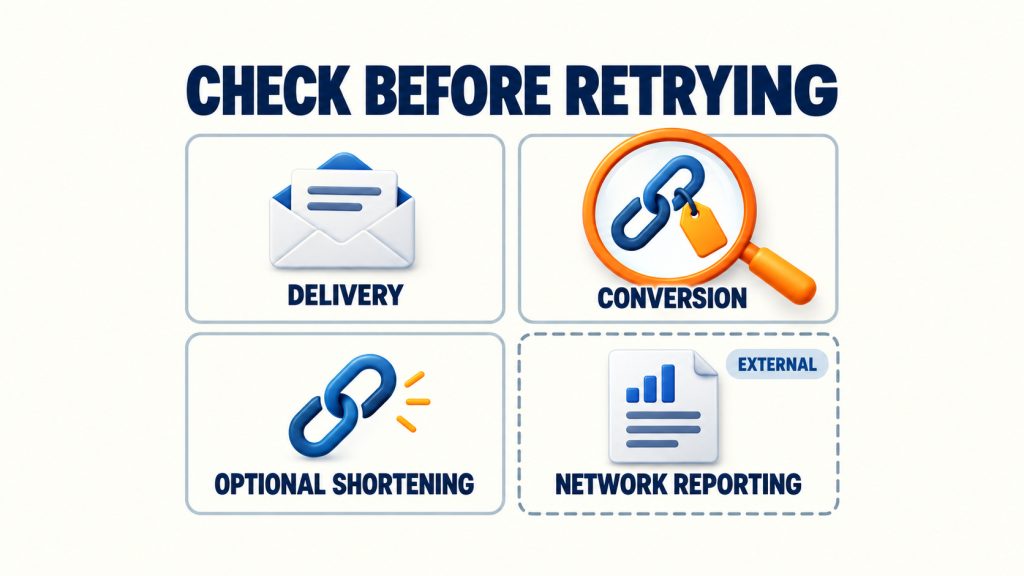
If an affiliate link did not change, find the failing stage before you edit settings or resend the deal. First read the original source message and the actual target. Then separate four questions: was the message delivered, did the selected converter handle the URL, was optional shortening applied, and did the merchant or network record attribution?
This avoids two common mistakes: treating a long but correctly converted link as a failure, and repeatedly sending a message whose delivery status is still unknown. A correct recovery fixes one cause, confirms the saved state, and uses one clearly marked private test—not another blast to your audience.
Product identity: use RedFox Auto Forward Telegram (@AutoForwardNew_Bot). The previous @Auto_Forward_Messages_Bot has moved to this current handle. Inspect your task through the Web dashboard, iOS app, or Android app.
AffiliateTelegram is AutoForward Messages’ official affiliate-workflow partner. We explain setup and troubleshooting; AutoForward provides the forwarding platform. Your merchant or network owns commission eligibility and reporting.
Start here: which result can you actually observe?
Keep a copy of the original message and inspect the intended target for that exact case and time. Copy or inspect the link destination, not just the visible label. If a send or settings change timed out, read back the target or saved task before repeating it.
No message found in the intended target, or delivery is uncertain
- Diagnostic branch: Delivery and route
- Safe next action: Check the source, target, task state, permissions, filters, and timing. Do not resend while the original outcome is unknown.
Message arrived, but the actual link did not receive the expected treatment
- Diagnostic branch: Converter, input, and later rules
- Safe next action: Check the same task’s saved mode and ID, supported URL shape, and any later rule that changes the URL.
The affiliate destination looks right, but the URL is still long
- Diagnostic branch: Optional shortening
- Safe next action: Check whether shortening is enabled and applicable. Inspect the long destination before calling conversion a failure.
The intended affiliate link is present, but a click, order, or commission is missing
- Diagnostic branch: Merchant or network reporting
- Safe next action: Check the relevant account, report period, and program rules. Do not change tags or replay messages simply to manufacture a report entry.
These are separate branches, not a promise that every workflow uses all four stages. In particular, EarnKaro conversion has its own key, mode and failure rules; it is not the direct-ID workflow.
Branch 1: no target message means delivery comes first
An unchanged link in the source says nothing about conversion if the expected message never reached the target. Before changing an affiliate ID:
- Read the source. Confirm the exact test message exists in the selected source, rather than a similarly named chat. Note whether it was a new message, an edit, a scheduled item, or a history-cloning operation; do not assume those paths are interchangeable.
- Read the task route and state. Confirm the intended connected account, source, target, and active or paused state. Read the actual target around the recorded time, including any configured delay, before deciding the message is absent.
- Check sending access and applicable rules. The intended sender needs access to the source and permission to post to the target. Filters or duplicate controls can prevent a message from being sent; a configured delay can postpone it.
- Pause before changing the route. Closing the dashboard or app does not pause a task: activated tasks run in RedFox’s cloud.
The official task guide documents source/target selection and task management. A server-dependent sample preview does not send a message or prove target permissions. For EarnKaro, a missing post can also be the configured result: a message held by the chosen failure action, or a setup or key error that holds the whole post. Follow its separate branch rather than forcing an original-message resend.
Branch 2: the message arrived, but its link did not change as expected
Inspect the clickable destination, not its text
A message may display “Buy here,” a product name, or a URL that differs from its embedded destination. Inspect the actual text-link URL in both source and target. If the purchase link is in a button, inspect that URL separately. Correct caption processing does not prove that the button changed; the Auto Clone Button documentation describes a separate button-rule workflow.
Reopen the same task and confirm what was saved
- Correct platform and value: enable the intended platform and use your own corresponding affiliate ID, not a product ID, shop ID, or source publisher’s value.
- Save and readback: reopen that exact task after saving. An unsaved form, failed request, or different task’s setting is not your active configuration.
- Missing or disabled value: for Flipkart and Shopsy, missing, null, empty, or whitespace-only IDs leave the input URL unchanged by that marketplace’s converter. This describes URL processing, not retention of an old saved ID; check the effective saved value separately. Their IDs are independent. For supported eBay item conversion, use the actual 10-digit EPN Campaign ID, not the shorter example in the broad guide.
- One intended converter per link: with EarnKaro marketplace selection, check which marketplaces use Default (your saved ID) or EarnKaro; a legacy EarnKaro task cannot also run active direct IDs.
The Affiliate Monetization guide documents the enable → enter ID → Save sequence and its common checks. Every enabled direct-ID platform needs the required information; leaving an unused platform enabled can explain why the form will not save.
Advanced configuration check: if support is examining an API-created or migrated task, the current nested Amazon/Awin value takes precedence over its legacy task-level counterpart, including an empty nested value. Two different stored representations should not be guessed at from a single visible field. Ask support to inspect effective configuration; do not overwrite the entire settings group to fix one ID.
Check the URL shape and the meaning of “changed”
Amazon redirect or wrapper
- What to check before changing settings: Conversion depends on a supported verified destination. A known input host or an Amazon URL inside a query does not guarantee support. Unresolved or out-of-scope links remain unchanged.
Flipkart, Shopsy, or eBay direct-ID mode
- What to check before changing settings: Confirm a supported product/item host and path. A search page or arbitrary short link is not evidence of a supported product input.
AliExpress
- What to check before changing settings: Use your own existing supported promotion link, shaped like
s.click.aliexpress.com/e/<token>. It is preserved before later Replace or eligible shortening. An unchanged owner-created promotion link can be expected; a stored Tracking ID does not retag someone else’s link or create one from a raw product URL.
Myntra through a chosen network
- What to check before changing settings: Use that network’s valid generated destination or wrapper with task-scoped Replace. There is no dedicated Myntra ID field; a made-up tracking query is not a repair.
Look for a later rule that undoes the converter
In eligible direct-ID workflows, affiliate processing precedes Replace and optional TeleURL shortening. A later Replace rule can replace the corrected URL with a fixed old link, remove the line containing it, or change its tracking parameter. Cleaner settings can also remove content you wanted to keep.
Inspect the rules that actually apply to the task. The Replace guide warns that leaving task scope blank applies a rule to all tasks, and that Show Header Forwarder can prevent Replace from running in the documented workflow. Check the actual forwarding mode as well as the rule; do not assume every mode processes replacements identically. Do not use an all-task edit to investigate one channel. In a private test route, isolate the link-changing rule and compare one new result; if the intended URL returns, repair that rule rather than rotating a valid affiliate ID.
A saved ID proves storage, not that the runtime has loaded the current feature or that a provider accepted the link. If the same supported input still fails under a minimal confirmed configuration, retain the evidence and escalate rather than adding more converters.
Branch 2A: EarnKaro needs a verified key and the right saved mode
EarnKaro is a provider converter, not an ordinary ID replacement or an AI/OCR key. Use your own key through the application’s secure credential-entry flow. Verification uses a real public product URL the provider supports and performs conversion only; it does not post to Telegram.
The selected key must belong to you, be an EarnKaro key, and have status Available. Saving or verifying it does not enable your task or change which saved key the task selects. A recognized shopping host is also not proof that the provider accepts every URL on it.
Check which mode the task uses. In releases that support marketplace selection, read the saved Default or EarnKaro choice for Amazon, Flipkart, Shopsy and Other, the selected key and the failure action. A marketplace on Default uses your saved ID; a marketplace on EarnKaro keeps that ID saved but unused. Final Redirect Link must be off for any marketplace selection.
A task without marketplace choices uses the legacy exclusive mode. There, other active IDs—including Amazon, Awin, Flipkart, Shopsy, Shopee, eBay, and AliExpress Tracking ID—effective affiliate/Shopee shortening and Final Redirect Link conflict, and legacy Amazon/Awin settings also participate. Conflicts are rejected, not silently removed. Keep your working direct-ID route intact rather than clearing it to experiment.
Available
- Safe next action: Confirm that this same owned key is selected in the intended task, with the intended marketplace choices (or the legacy switch) saved and no conflicts. Availability is not a delivery or commission receipt.
PendingVerification
- Safe next action: Check product-URL support and provider availability; verify the same saved key after correcting the cause.
QuotaExceeded
- Safe next action: Wait at least one minute before verifying the same saved key again. Do not hot-retry or create duplicate keys.
Invalid
- Safe next action: Replace the value of the existing saved key through secure entry and verify with a supported product URL. Do not send the key to support.
Timeout, missing response, or mismatched result
- Safe next action: Read the saved key and task state before another operation. Cancelling a local prompt does not cancel a mutation already sent.
Do not call an unchanged original message successfully converted. With marketplace selection, an unconverted link follows the chosen failure action—removed, kept as the original or holding the message—and none of those is a conversion; in legacy mode an unconfirmed result keeps the original URL. Neither is the long-link fallback described for TeleURL. Key availability and settings readback alone do not establish loaded runtime support, a successful converted send, or attribution.
Branch 3: a long URL may be the correct fallback
First inspect the long URL. If the intended affiliate destination is present, conversion and shortening have different outcomes. The TeleURL overview explains that shortening is optional and that eligible long URLs remain when shortening fails.
- Was shortening actually enabled for this type? Per-type settings can inherit the general configuration, turn shortening on, or turn it off. An off setting does not disable affiliate conversion.
- Was the effective selected TeleURL key usable? It needs to be your owned TeleURL key with status Available. An unusable selected key does not trigger automatic selection of another key.
- Is this an eligible destination? Unrelated Telegram links, headers and footers, and arbitrary whole-caption Replace output are not automatically shortened. The Amazon US literal product-URL-and-tag mode is outside this path.
- Is this EarnKaro? TeleURL is not a fix for a failed conversion. With marketplace selection it can shorten only a confirmed converted link, using that marketplace’s effective setting (Other uses the common one) and keeping the converted URL if shortening fails; a legacy EarnKaro task cannot have active shortening.
With an eligible direct-ID/Replace result, TeleURL errors, timeouts, or a key becoming unavailable can leave the final long URL in the forwarded message. Check it rather than replaying the post. A short link does not prove that its destination carries your ID or that a purchase qualifies.
Branch 4: the link looks right, but reporting is missing
Move this question to the merchant or network dashboard. Check the account and marketplace associated with your ID, the report period and timezone, whether the event is a click or order, and whether the commission is pending, approved, reversed, or paid. Do not substitute a Telegram view or a shortener click for a validated purchase.
For example, Amazon’s India Operating Agreement distinguishes properly formatted Special Links and qualifying purchases, with exclusions. The US Program Policies have their own qualifying-purchase and disqualification rules. Use your own market’s terms; neither document is universal permission for every Telegram placement or redirect arrangement.
Do not buy through your own link or encourage artificial clicks to “prove” tracking. A visible ID is a link-processing observation; the program’s reports and rules determine attribution. Missing commission alone does not establish that AutoForward failed to replace the ID.
Recovery: one change, readback, one private case
- Preserve the original evidence. Record the source and target observations and time before changing anything. If delivery remains unknown, stop replaying and ask support to reconcile it.
- Isolate the issue in a private route. Use channels you control with no live audience and keep the task paused while editing. If creating a new task, start with an empty source and pause immediately after creation.
- Make one narrow correction. Fix the supported input, saved mode/ID, effective key selection, or scoped rule identified by the branch. Leave unrelated working tasks alone.
- Reopen the exact task. Confirm the intended saved value, route, mode, and state. If the save result was unclear, read it back before another save.
- Run one new labeled case. Activate the test task, post one safe message without invented offer claims, then inspect its actual target URL and landing page. Pause again before more changes.
Open AutoForward and inspect the exact task before another test → If you are designing a route from scratch rather than repairing one, use the wider affiliate workflow guide.
Copy this sanitized support worksheet
Use this as a blank form, not a fabricated error report. Replace the bracketed prompts with observations. Share only through the product’s official support route; the official help documentation lists in-app Help & Support and [email protected].
Stage and intended result
- What to provide safely: [Delivery / conversion / shortening / attribution]; [what you expected].
Mode and marketplace
- What to provide safely: [Direct ID / EarnKaro per marketplace or legacy / existing AliExpress promotion / network Replace]; [marketplace and country].
Task and processing path
- What to provide safely: [Neutral test-task label]; [new message / edit / clone / schedule]; [Web / iOS / Android]. Share a task identifier privately only if official support needs it; never a session token.
Time
- What to provide safely: [Date, local time, and timezone]; [last relevant setting change].
Source readback
- What to provide safely: [Exact message found or absent]; [neutral local reference such as Test A]; [caption, embedded text link, or button]. No private invitation link or unrelated chat history.
Target readback
- What to provide safely: [Found / absent / still unknown]; [actual observed text/link treatment]. Keep absence separate from uncertainty.
Sanitized input and output
- What to provide safely: [Host and path shape, parameter names, redirect family, and redacted account values]; [same or different landing product/seller/variant]. Label any redacted URL as non-runnable.
Saved settings and key state
- What to provide safely: [Platform/mode enabled and confirmed after reopen]; [shortening on/off/inherit]; [provider and status only]; [conflicts checked]. Never the API key or even its masked preview.
Rules and isolation
- What to provide safely: [Task-scoped URL-changing rules relevant to this case]; [one change tried]; [observed private-test result]. Remove unrelated identifiers from screenshots.
Safe error details
- What to provide safely: [Error code and field, if shown]; [redacted safe status message]. Do not attach raw requests, Authorization headers, exports, or credential-bearing logs.
Sanitization example, not a test result: describe an Amazon input as amazon.in/dp/<ASIN>?tag=<redacted-tag>&seller=<redacted-seller>. Preserve parameter names and report whether the product and seller matched; remove account values. For an opaque promotion or short-link token, report its host/path family instead of publishing the token. If official support needs an exact public product URL to reproduce a case, provide only a genuinely public, credential-free URL privately—not a session-bound or private-chat link.
For API-integrated tasks: an HTTP 200 response can still contain GraphQL errors. A settings error such as BAD_USER_INPUT may include extensions.field identifying the rejected field; report that shape, not the request body. Authentication, permission, and not-found errors belong to access troubleshooting, not another affiliate tag. Readback after a timeout is safer than automatic replay.
Next action: choose the branch supported by what you actually observed. If one private case still fails after a narrow confirmed correction, send the worksheet through official support and leave the affected route paused. You can use the Web dashboard or the official iOS and Android apps to inspect that route; more retries are not a substitute for a known result.