
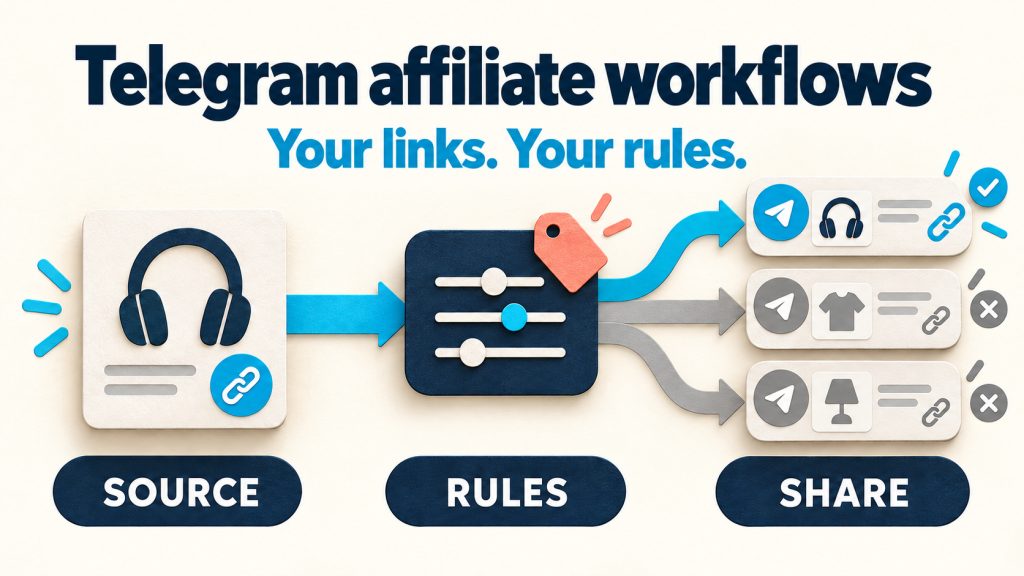
Telegram affiliate automation works best when it automates your rules—not your judgment. With RedFox Auto Forward Telegram, you can take posts from chosen sources, apply your configured IDs to supported affiliate links, refine the message, and deliver it to the destinations that fit. You still choose the deals worth sharing and check that your affiliate program permits the placement.
If you already run a deal channel, the opportunity is practical: stop changing the same links and tidying the same captions by hand. Build one repeatable workflow, prove that it produces the post you want, then expand it.
Product identity: use RedFox Auto Forward Telegram (@AutoForwardNew_Bot). The previous @Auto_Forward_Messages_Bot has moved to this current handle. For day-to-day configuration, start with the Web dashboard, iOS app, or Android app.
AffiliateTelegram is AutoForward Messages’ official affiliate-workflow partner. We explain affiliate setup and use cases; AutoForward provides the forwarding platform. Neither this guide nor AutoForward guarantees sales or commissions.
What to automate first: the work you repeat for every deal
Start with three repeated jobs: selecting relevant messages, applying the right affiliate settings, and producing a readable post. A channel does not become better simply because it publishes more often.
AutoForward’s controls cover more than forwarding. Keyword, sender, and content-type filters help choose what reaches a destination. Replace and Cleaner settings reshape the content; headers and footers add consistent context. Affiliate settings process supported links, while duplicate filters help reduce repeated messages. The AffiliateTelegram feature overview explains these tools together.
Activated forwarding tasks run in RedFox’s cloud. You do not need to leave the Web dashboard or mobile app open for an activated task to keep running. That removes the need to sit beside your phone—not the need to review the quality of your sources and posts.
A good first goal: one useful source, one focused destination, one affiliate mode, and a small set of rules you can explain. Skip AI, shortening, and extra destinations until the basic output is right.
Five decisions behind a useful Telegram affiliate workflow
Think of the workflow as five decisions, not a shopping list of switches. These are responsibilities to configure and inspect, not a claim that every optional feature runs in this exact technical order.
| Decision | What you decide | AutoForward control |
|---|---|---|
| 1. Source | Which chats contain useful content you are allowed to reuse? | Task source selection |
| 2. Relevance | Which messages belong in this destination? | Whitelist, Blacklist, sender and type filters |
| 3. Links | Which supported affiliate mode and account settings should apply? | Affiliate Monetization IDs, EarnKaro conversion, or a per-marketplace mix where supported |
| 4. Presentation | What should be kept, replaced, removed, or added? | Replace, Cleaner, headers and footers |
| 5. Destination | Where should the finished message go? | Telegram targets; connected External Publish destinations when needed |
Filters and cleanup do different jobs. A filter can stop an irrelevant message from being forwarded. Cleanup changes what remains inside a message. For an affiliate channel, removing every URL would remove the purchase path you meant to keep. Use the Whitelist guide for message selection and the Cleaner guide for content cleanup.
Choose the right affiliate-link mode before you add rules
Your affiliate ID identifies your account or campaign within a merchant or network. It is not the product ID, the shop ID, or proof that a purchase will earn a commission. Pick the mode you actually use; do not enable every marketplace because the fields are available.
| Your workflow | How to approach it | Important distinction |
|---|---|---|
| Amazon, Awin, Flipkart, Shopsy, Shopee, or eBay | Configure your own supported affiliate ID or Campaign ID. | Conversion applies to supported link formats. Flipkart and Shopsy have independent IDs. |
| EarnKaro | Use your own verified EarnKaro key with status Available, then choose Default or EarnKaro per marketplace where your release supports it. | Saved IDs stay on the task for Default marketplaces; Final Redirect Link must be off. Older task-wide EarnKaro setups stay exclusive: clear other active IDs, including AliExpress Tracking ID, and disable affiliate shortening and Final Redirect Link. |
| AliExpress | Supply an existing supported promotion link created through your own affiliate account. | A stored Tracking ID does not turn an ordinary product URL into your promotion link or transfer ownership of someone else’s link. |
| Myntra through an affiliate network | Use Replace rules based on the valid link or wrapper format your network supplies. | There is no dedicated Myntra ID field; do not invent a tracking parameter. |
Use the official Affiliate Monetization guide for the settings entry point. Follow the distinctions above when choosing a workflow: not every displayed ID field performs the same kind of conversion.
Shortening is optional. For eligible direct-ID/Replace link workflows, TeleURL runs after affiliate processing and Replace. You can keep the full affiliate URL or choose shortening for supported link types. If TeleURL cannot create a short link, the eligible long affiliate URL remains in the message. With EarnKaro marketplace selection, shortening can follow only a confirmed conversion, and that fallback never means a failed or unconfirmed EarnKaro conversion succeeded. See the optional TeleURL workflow.
Open AutoForward and choose one affiliate workflow → Start with the mode linked to your existing affiliate account, not a new account you do not need.
Example: a headphone deal belongs in electronics—not every channel
Imagine you operate an electronics-deals channel. Your permitted source also publishes clothing and home products. Your goal is to forward headphone posts with the relevant affiliate settings, preserve the offer conditions, and add a consistent disclosure.
Illustrative source message—not a live offer:
Wireless headphones — ₹1,999
Use code AUDIO10. Check the seller’s terms and current availability.
Amazon product link carrying the source’s tracking tag.
Desired destination message:
Wireless headphones — ₹1,999
Use code AUDIO10. Check the seller’s terms and current availability.
The same supported product link with your configured Amazon tag.
Affiliate link: we may earn a commission on qualifying purchases.
The price, coupon, currency, and conditions in this example are fictional teaching content. They are not a current promotion or a test result. Use the disclosure required by your own program and market.
- Select: start with a Basic Whitelist phrase such as “headphones,” scoped to this task. It matches text—not an automatic product-category assessment.
- Configure: use the Amazon tag appropriate to your affiliate account and marketplace. Preserve the product destination and verify the output link.
- Format: keep the offer conditions; add a short footer without removing the purchase link or required attribution.
- Route: send the result to the electronics destination. A shirt post that does not match the rule should not go there.
A false match is worth checking too: “not headphones” still contains the word “headphones.” Add a specific exclusion only if your actual source uses it, and test both matching and nonmatching messages. Simple rules are useful because you can inspect why a post passed.
Start with one controlled forwarding task
- Prepare two private test channels you control: one source and one destination. Confirm the connected Telegram account can access the source and send to the destination. Do not select a real audience for your first test.
- Create a task: open the Forwarding List, choose Create Task, then select those source and target chats. Use a clear label such as
affiliate_test. The official task-creation guide covers the entry point. - Pause immediately after creation: the task-creation guide says new tasks are activated. Return to the Forwarding List and pause the test task before adding any source messages. Configure only this task. For a direct-ID workflow, open its feature settings → Affiliate Monetization, enable the relevant platform, enter your ID, and save. EarnKaro uses the separate mode described above. Add your relevance and formatting rules while the task remains paused.
- Inspect a sample when available: the sample preview depends on server availability. It does not post a message, although TeleURL calls may use shortening quota.
- Run a controlled test: activate the configured task and place safe sample messages in the test source. Inspect the actual destination—not just the saved settings. Pause again before changing source or target to real chats.
Use only material you own or are authorized to republish. Access to a chat does not automatically grant permission to redistribute its content. Check merchant and network rules for the intended Telegram or external placement; successful conversion is not policy approval.
Checks before your real channel goes live
Use a small acceptance set. It is more useful than checking that every switch is on.
| Sample | What to inspect |
|---|---|
| Relevant deal with a supported product link | Right destination; expected affiliate result; unchanged product/variant; readable caption; correct offer conditions. |
| Unrelated deal | The configured relevance rule prevents it reaching this destination. |
| Relevant post with an unsupported link | Do not call an unchanged URL “converted.” Inspect the output and decide whether that link belongs in your channel. |
| Post with purchase buttons | Check every button destination separately from the caption link. Caption affiliate processing is not proof that button URLs changed. |
| Repeated message, if using duplicate filters | Verify the actual configured scope. Message deduplication does not automatically mean same-product or price-update detection. |
Then check real-account IDs, task scope, source/target permissions, and the current plan or add-on requirements for the controls you selected. Avoid Apply For All Tasks while experimenting. Expand only after the first task’s output is right.
Check results in the right place. An output link can show that your configured ID was applied. A merchant or network report determines whether clicks, orders, and commissions were recorded and approved. For example, Amazon’s US Associates Program Policies define qualifying purchases and exclusions; use the policies for your actual market rather than applying US rules everywhere.
Add advanced features when they solve a specific problem
The toolkit gives you room to grow. Add a control because it fixes an observed issue—not because a larger configuration looks more professional.
- Repeated posts: enable and test duplicate filters. Keep useful corrections and updated offers distinguishable from identical reposts.
- Purchase links in buttons: use Auto Clone Button’s URL filtering, replacement, and deduplication where available. Check add-on access and actual URLs; callback buttons are different from URL buttons.
- Captions that need editing: start with predictable Replace rules. Add AI rewrite when it helps your channel voice, with instructions to preserve prices, coupons, dates, links, and disclosure. Review samples; AI does not guarantee factual preservation.
- Useful text trapped in images: OCR can extract it. Check coupon characters and expiry details against the original image before relying on the output.
- Another audience on WhatsApp, Discord, VK, X, or email: External Publish can serve connected destinations. Check the destination’s setup and your affiliate program’s placement rules before enabling it.
- Planned reminders: use scheduling for content that remains valid. A schedule does not verify merchant prices, stock, or coupon expiry. Test the selected processing path rather than assuming every mode behaves identically.
Keep one task per clearly defined purpose. Separate audience-specific settings when they differ; this makes errors easier to find and prevents one channel’s replacements from affecting another.
Common questions
Do I need coding skills?
No coding is needed for the basic workflow described here: choose chats, set a supported affiliate mode, and configure ordinary rules in the Web dashboard or mobile app. Advanced regex rules are optional. Start with simple settings you can test.
Can I turn every shopping link into my own affiliate link?
No. Processing depends on the supported link format and the chosen mode. Existing AliExpress promotion links and Myntra network wrappers are different from direct-ID conversion. An unchanged or shortened link is not automatically proof of your attribution.
Will tasks keep running if I close the app?
Yes. Activated forwarding tasks run in RedFox’s cloud; the management screen does not need to remain open. The task still needs valid configuration, account access, and any required provider or plan access.
Should I enable AI and short links immediately?
Only if they solve a real need. First verify relevance, affiliate output, and caption accuracy with a simple task. AI can add processing time and provider usage; shortening is optional and uses the selected service’s quota.
Does AutoForward pay affiliate commissions?
No. AutoForward is automation software, not the merchant or affiliate network. Your network handles eligibility, tracking, order validation, and commissions. The software does not guarantee clicks, sales, or earnings.
Your next step: build one task that handles one kind of deal well. Use your own supported affiliate settings, keep the audience focused, and verify a real test message before moving to production.
Build your first affiliate workflow in AutoForward →
Prefer mobile? Use the official iOS app or official Android app. The current Telegram entry point is @AutoForwardNew_Bot.